┌────────────────────────────┐
│ │
│ usuaris 6.2.* README │
│ │
└────────────────────────────┘
usuaris is a app "admin users server", writed in PHP, bash and C.
This is an special version for FreeBSD.
usuaris is compatible with apache24 with:
Server API: fpm-fcgi (php-fpm)
Server API: apache2handler (libapache2-mod-php) with the mpm_itk_module
==> For download:
http://cucurella.net/soft/usuaris_freebsd/
ATTENTION: This program is tested and optimitzed for 'FreeBSD 13.1', 'FreeBSD 13.2', 'FreeBSD 14.0', 'FreeBSD 14.1', 'FreeBSD 14.2' and 'FreeBSD 15.1'.
If you run Debian GNU/Linux, please download Linux version.
###################
### REQUERIMENTS
==> Disk quotes enabled in /home (Please read file: 'disk_quotes')
### Install utils:
pkg install bash logrotate wget curl
### Install apache:
pkg install apache24 ap24-mod_mpm_itk
### Install PHP (mod_php):
pkg install mod_php85
### Install PHP (php-fpm):
pkg install php85
### Install PHP modules
pkg install php85-gd php85-zip php85-curl php85-fileinfo php85-exif php85-gettext php85-posix php85-mbstring php85-pdo_sqlite php85-sockets
### Install PHP other modules (for phpMyAdmin):
pkg install php85-session php85-filter
### Install openssl:
pkg install openssl
### Install PHP MySQL:
pkg install php85-mysqli
###################
### Create php.ini:
cp /usr/local/etc/php.ini-production /usr/local/etc/php.ini
###################
### Create dirs:
mkdir /usr/local/etc/apache24/sites-available
mkdir /usr/local/etc/apache24/sites-enabled
mkdir /usr/local/etc/apache24/php-users
mkdir /usr/local/etc/apache24/mpm-itk-users
###################
### Create user 'usuaris':
echo YOUR_PASSWORD_HERE | pw useradd usuaris -c "usuaris user" -m -s /bin/sh -h 0
###################
### Create file /usr/local/etc/apache24/php-users/usuaris.conf:
<Directory /home/usuaris/public_html>
<FilesMatch \.php$>
SetHandler "proxy:unix:/var/run/php-fpm-usuaris.sock|fcgi://localhost"
</FilesMatch>
</Directory>
###################
### Create file /usr/local/etc/apache24/mpm-itk-users/usuaris.conf
<IfModule mpm_itk_module>
<Directory "/home/usuaris/public_html">
AssignUserID usuaris usuaris
</Directory>
</IfModule>
###################
### Create file /usr/local/etc/php-fpm.d/usuaris.conf:
[usuaris]
listen = /var/run/php-fpm-usuaris.sock
listen.allowed_clients = 127.0.0.1
listen.owner = www
listen.group = www
user = usuaris
group = usuaris
pm = dynamic
pm.max_children = 100
pm.start_servers = 3
pm.min_spare_servers = 3
pm.max_spare_servers = 10
pm.max_requests = 500
###################
### Create file /usr/local/etc/apache24/Includes/php-fpm.conf:
<IfModule proxy_fcgi_module>
DirectoryIndex index.php index.html
### Enable http authorization headers
<IfModule setenvif_module>
SetEnvIfNoCase ^Authorization$ "(.+)" HTTP_AUTHORIZATION=$1
</IfModule>
### Deny access to raw php sources by default
### To re-enable it's recommended to enable access to the files only in specific virtual host or directory
<FilesMatch ".+\.phps$">
Require all denied
</FilesMatch>
### Deny access to files without filename (e.g. '.php')
<FilesMatch "^\.ph(ar|p|ps|tml)$">
Require all denied
</FilesMatch>
</IfModule>
###################
### Create file /usr/local/etc/apache24/Includes/php.conf
<IfModule !proxy_fcgi_module>
<FilesMatch "\.php$">
SetHandler application/x-httpd-php
</FilesMatch>
<FilesMatch "\.phps$">
SetHandler application/x-httpd-php-source
</FilesMatch>
</IfModule>
###################
### Add this to file /usr/local/etc/apache24/httpd.conf:
# userdir
Include etc/apache24/extra/httpd-userdir.conf
# ServerName
ServerName localhost
# no indexes
<Directory "/home/*/public_html">
Options -Indexes
</Directory>
IncludeOptional /usr/local/etc/apache24/sites-enabled/*.conf
IncludeOptional /usr/local/etc/apache24/php-users/*.conf
IncludeOptional /usr/local/etc/apache24/mpm-itk-users/*.conf
###################
### Create file /usr/local/etc/apache24/sites-available/000-default.conf:
<VirtualHost *:80>
ServerName localhost
ServerAdmin webmaster@localhost
DocumentRoot /usr/local/www/apache24/data/
</VirtualHost>
###################
### For enable 000-default.conf, create simbolic link:
cd /usr/local/etc/apache24/sites-enabled/
ln -s ../sites-available/000-default.conf .
###################
### userdir
Edit file /usr/local/etc/apache24/httpd.conf, and uncomment this line:
LoadModule userdir_module libexec/apache24/mod_userdir.so
Edit file /usr/local/etc/apache24/extra/httpd-userdir.conf like this:
UserDir public_html
#Userdir disabled
###################
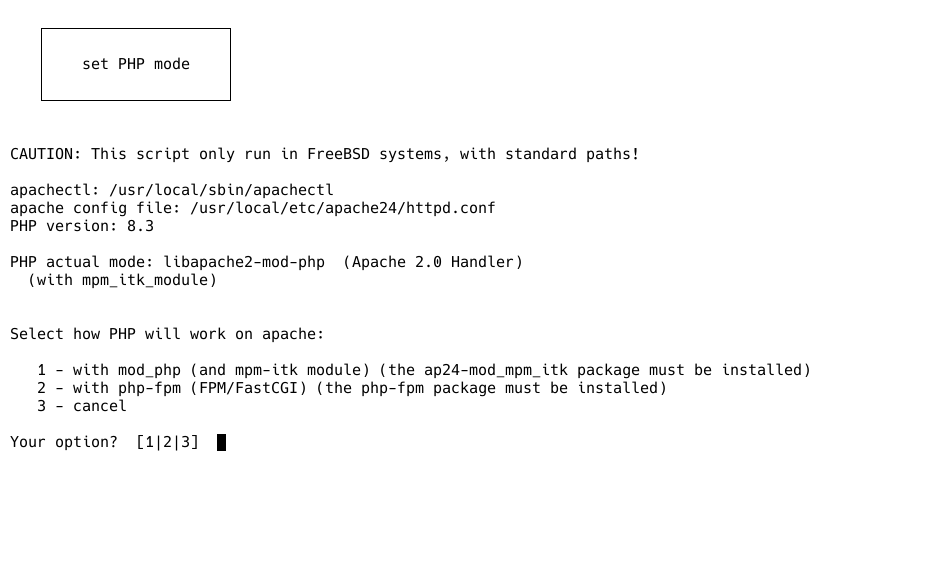
### select how run PHP from a bash script:
cd usuaris_dir/admin/INSTALL/
chmod 0755 php_mode.sh
sudo ./php_mode.sh
 ###################
### mysql
Please read file 'MySQL'
###################
### Config in /etc/rc.conf:
apache24_enable="YES"
php_fpm_enable="YES"
quota_enable="YES"
check_quotas="YES"
mysql_enable="YES"
###################
### start servers
service apache24 start
service php_fpm start
service mysql-server start
###################
### samba:
pkg search samba
pkg install samba423
Copy smb4.conf to /usr/local/etc/smb4.conf
Config in /etc/rc.conf:
samba_server_enable="YES"
service samba_server start
###################
### proftpd:
pkg install proftpd
Config in /etc/rc.conf:
proftpd_enable="YES"
hostname
my_host_name
In file /etc/hosts:
127.0.0.1 localhost localhost.my.domain my_host_name
service proftpd start
###################
### Midnight Commander
pkg install mc
chsh -s /bin/sh root
So that Midnight Commander changes to the current directory upon exit:
Content of file /usr/local/libexec/mc/mc-wrapper.sh
And add this to file /root/.shrc
alias mcedit='mcedit -u'
alias mc='. /usr/local/libexec/mc/mc-wrapper.sh'
###################
### static IP:
ifconfig
ue0: flags=8843<UP,BROADCAST,RUNNING,SIMPLEX,MULTICAST> metric 0 mtu 1500
options=80009<RXCSUM,VLAN_MTU,LINKSTATE>
ether b8:27:eb:73:b3:44
bla, bla, bla...
In /etc/rc.conf:
ifconfig_ue0="inet 192.168.1.99 netmask 255.255.255.0"
defaultrouter="192.168.1.1"
###################
### Other changes that make life easier for Linux users:
Add this to file /root/.shrc
alias logout='exit'
alias shutdown='shutdown -p now'
###################
### mysql
Please read file 'MySQL'
###################
### Config in /etc/rc.conf:
apache24_enable="YES"
php_fpm_enable="YES"
quota_enable="YES"
check_quotas="YES"
mysql_enable="YES"
###################
### start servers
service apache24 start
service php_fpm start
service mysql-server start
###################
### samba:
pkg search samba
pkg install samba423
Copy smb4.conf to /usr/local/etc/smb4.conf
Config in /etc/rc.conf:
samba_server_enable="YES"
service samba_server start
###################
### proftpd:
pkg install proftpd
Config in /etc/rc.conf:
proftpd_enable="YES"
hostname
my_host_name
In file /etc/hosts:
127.0.0.1 localhost localhost.my.domain my_host_name
service proftpd start
###################
### Midnight Commander
pkg install mc
chsh -s /bin/sh root
So that Midnight Commander changes to the current directory upon exit:
Content of file /usr/local/libexec/mc/mc-wrapper.sh
And add this to file /root/.shrc
alias mcedit='mcedit -u'
alias mc='. /usr/local/libexec/mc/mc-wrapper.sh'
###################
### static IP:
ifconfig
ue0: flags=8843<UP,BROADCAST,RUNNING,SIMPLEX,MULTICAST> metric 0 mtu 1500
options=80009<RXCSUM,VLAN_MTU,LINKSTATE>
ether b8:27:eb:73:b3:44
bla, bla, bla...
In /etc/rc.conf:
ifconfig_ue0="inet 192.168.1.99 netmask 255.255.255.0"
defaultrouter="192.168.1.1"
###################
### Other changes that make life easier for Linux users:
Add this to file /root/.shrc
alias logout='exit'
alias shutdown='shutdown -p now'